
Xantrex PROwatt SW remote port: wiring and phone control
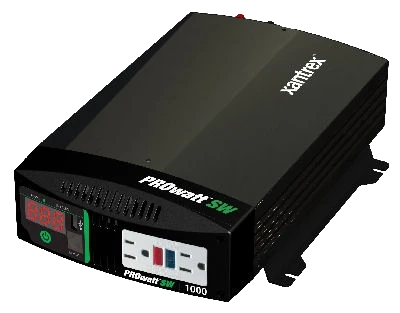
Xantrex RJ11
- PROwatt SW series
- Airstream factory installs (PROwatt SW)
The Xantrex PROwatt SW has a small phone-style jack on the front, meant for Xantrex’s own wired remote panel (808-9001). That jack is all our Inverter Controller needs. There is no digital communication on it: the panel just shorts two wires to switch the inverter, and the inverter powers the panel’s LED while it runs.
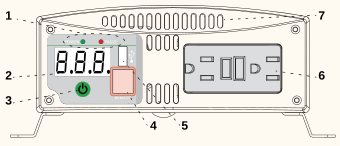
The remote port (4) on the front of a PROwatt SW, just below the USB port (5). Drawing from Xantrex’s owner’s guide.
The jack is an RJ12 (six positions), but only the middle four wires are used, so a regular four-wire RJ11 phone cord fits as well. Switching is a toggle: a short press turns the inverter on, the next one turns it off. Our controller reads the LED line, so it can also tell you whether the inverter is actually on.
Which wire does what
Different sources count the pins from different sides of the jack, so we’d rather go by wire colour. On a standard RJ11 cord:
- Red and yellow are the on/off switch
- Green (+) and black (−) power the LED while the inverter is on
- The two outer wires, if your cable has them, are an optional ignition lock-out and can be left alone
Checking it with a multimeter
Cables and remote revisions differ, so check before you solder anything. Unplug the cable from the remote panel and put your multimeter in continuity mode. Red and yellow should beep only while you hold the panel button down. Then briefly touch red and yellow together at the loose cable end (that’s all the button does) and the inverter should start. With the multimeter on DC, measure between green and black: you should get a reading while the inverter runs, and none once you tap red and yellow again to turn it off. If both of these match, you’re good to go.
One thing to watch out for: the Freedom SW looks similar but uses a different remote (808-9002) on a port on its side. What’s on this page doesn’t apply to that one.
Further reading
We haven’t had a PROwatt SW on our own bench yet. The pinout on this page comes from Xantrex’s panel diagram, an owner who measured their own remote, and a DIY Solar Forum member who switched their inverter on by jumping the wires by hand. All three agree. These are worth a read if you want the details:
- Air Forums: pin-out of the Airstream (Xantrex) remote inverter switch
- DIY Solar Forum: pinout for the Xantrex PROwatt remote port
- Xantrex PROwatt SW owner’s guide (PDF)
Xantrex® and PROwatt® are trademarks of their respective owners. VanTurtle is not affiliated with, endorsed by, or sponsored by Xantrex. We only mention them to show compatibility.
Switch it from your phone
Our Inverter Controller plugs into the Xantrex PROwatt SW remote port and lets you switch it over Bluetooth, from the Home app on iPhone or Device Controls on Android. No cloud or hub, so it keeps working off-grid. Tell us your model when you order and we’ll set it up for this pinout before it ships. From €19,99.
