
KISAE and Magnum CSW1012 inverter remote port: wiring and phone control
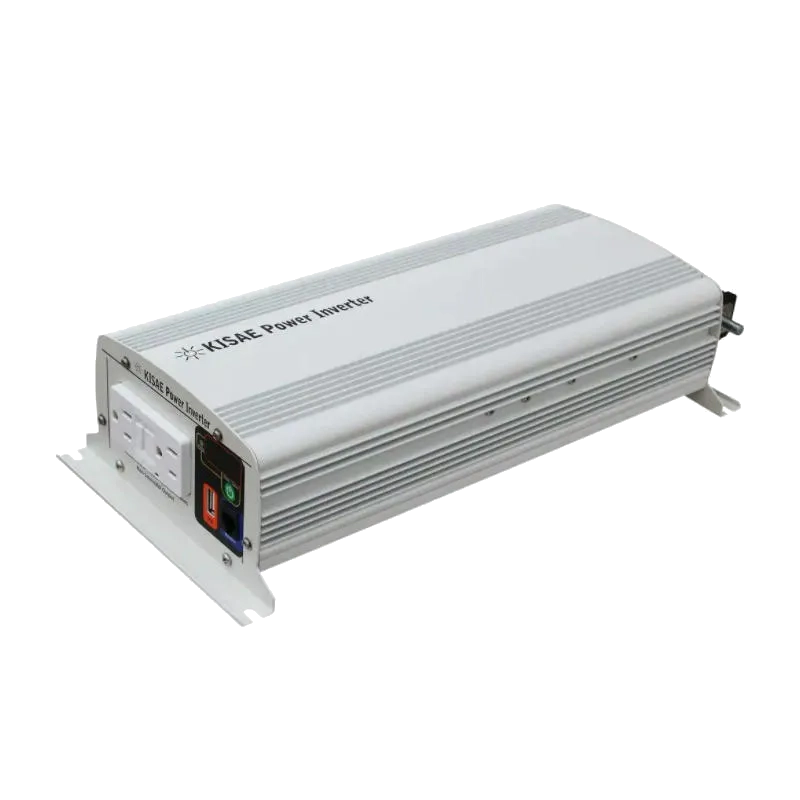
KISAE RJ11
Also sold as Magnum Energy
- MW1210
- MW1215
- SW1210
- SW1220
- CSW1012 (Magnum)
KISAE’s single inverters have an RJ11 phone jack on the front panel for the RM1201 remote switch, a small metal panel with a push button and, on newer versions, a green power LED. Magnum Energy sells the same inverter as the CSW1012, with its own CSW-RS remote (a rocker and a green LED) on the port marked “Remote”. Either way, that jack is all our Inverter Controller needs. There is no digital communication on it: according to KISAE, the remote’s button is wired in parallel with the power button on the inverter’s front panel.
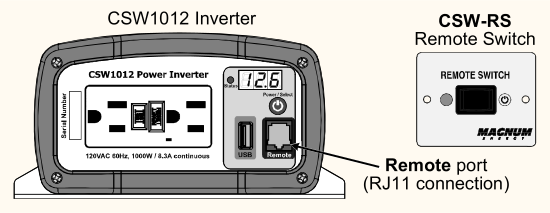
The Remote port on a Magnum CSW1012, the same inverter KISAE sells. Drawing from Magnum’s CSW-RS guide.
Switching is a toggle: a short press turns the inverter on, the next one turns it off, just like the front button. Magnum says to hold the rocker for about one second, so our controller holds the contact long enough for the inverter to notice. On inverters made from the end of 2013 onwards, including the CSW1012, the inverter also feeds the remote’s green LED, so our controller can read it and tell you whether the inverter is actually running. Older KISAE inverters don’t drive the LED, so on those the controller can switch the inverter but can’t read back whether it’s on.
Finding the right wires
Neither KISAE nor Magnum publishes which pin does what, but both remotes use a regular four-wire phone cable. KISAE even says you can connect several remotes to one inverter with standard phone splitters, and Magnum says you can extend the cable with a normal phone extension. So a regular phone cord between the inverter and our controller will do. Two of its wires are the switch, two are the LED, and the multimeter check below tells you which are which.
Checking it with a multimeter
We know how this remote works, but not yet which pins do what, so this check is the part that makes it work. Unplug the cable from the remote and put your multimeter in continuity mode on the remote’s own jack. The Magnum CSW-RS has a hardwired cable, so on that one do it on the plug end instead. Hold the button down and test the pins against each other: the pair that beeps only while the button is held is your switch pair. Then plug a phone cord into the inverter only and touch those two wires together at the loose end for about a second: the inverter should start, and the next touch should stop it. Phone cords are often rolled over, so if nothing happens, try the mirrored pair. On a newer inverter, the LED is the pair that’s left: with the multimeter on DC, you should get a reading between them while the inverter runs, and none when it’s off. If all of this matches, you’re good to go.
One thing to watch out for: this page is about the single inverters (KISAE MW1210, MW1215, SW1210 and SW1220, and the Magnum CSW1012) with the RM1201 or CSW-RS remote. KISAE’s inverter/chargers use other remotes, and we don’t know enough about those yet. Magnum’s bigger inverters and inverter/chargers use network remotes that talk to the inverter in data, and our controller doesn’t work with those.
Further reading
We haven’t had one of these on our own bench yet. What’s on this page comes from KISAE’s RM1201 document and Magnum’s CSW-RS owner’s guide, which explain how the remote works but not the pin functions. Once a customer has done the check above, we’ll add the pinout here. They’re worth a read if you want the details:
- KISAE RM1201 remote switch for single inverters (PDF)
- Magnum CSW-RS remote switch owner’s guide (PDF)
- ManualsDir: Magnum CSW-RS remote switch
KISAE® and Magnum Energy® are trademarks of their respective owners. VanTurtle is not affiliated with, endorsed by, or sponsored by KISAE or Magnum Energy. We only mention them to show compatibility.
Switch it from your phone
Our Inverter Controller plugs into the KISAE or Magnum remote port and lets you switch it over Bluetooth, from the Home app on iPhone or Device Controls on Android. No cloud or hub, so it keeps working off-grid. Tell us your model when you order, and after a quick multimeter check on your end we’ll set it up for you. From €19,99.
