
vintage-retro-wavy-lines-background-4

Use the build-in ethernet port to control your MaxxFan

Upgrade Your MaxxAir

The VanTurtle Fan Controller provides digital control of up to two MaxxFans through the RJ45 (Ethernet) or RJ11 port already installed on the fan. Pair it with an ESP32 for Wi-Fi access or a Raspberry Pi for seamless integration with Home Assistant.

ethernet

Plug and Play

Connects straight to the fan’s RJ45 or RJ11 port

fan

Full Fan Control

On/off, open, close, speed up, slow down, reverse airflow

chip

Works With Anyting I2C

Compatible with Raspberry Pi, ESP32, Arduino, etc

home-automation

Smart Home Ready

Perfect for Home Assistant automations

We're the bridge between your fan and any microcontroller

Ever wished you could control your MaxxFan from your phone, automate it to react to temperature, or close it automatically when you start driving? That’s exactly what the VanTurtle Fan Controller makes possible.

plus_and_deluxe

MaxxFan Deluxe or Plus

These fans already come with with a port to control them. Normally this is done with a simple button panel, but our controller emulates this same protocol to enable a whole host of new possibilities. The controller can do anything the button panel can do: On/off, open/close, in/out, faster, slower, and auto temperature.

board_in_circle

VanTurtle Fan Controller

The controller translates the fan’s proprietary signals into the industry standard I2C bus. Just connect an Ethernet or phone cable to the fan and you’re good to go. For Deluxe models it can also sense if the auto temperature hold mode is on. The controller is extensively documented and extendible.

microcontrollers

Microcontroller

All you need is I2C support, so you can integrate it with almost any microcontroller. Raspberry pi, ESP32, Arduino, STM32, the works. Integrate it into Home Assistant, write your own python scripts, control it over Bluetooth, anything you’d like. Whatever setup you’re running, the VanTurtle controller fits right in.
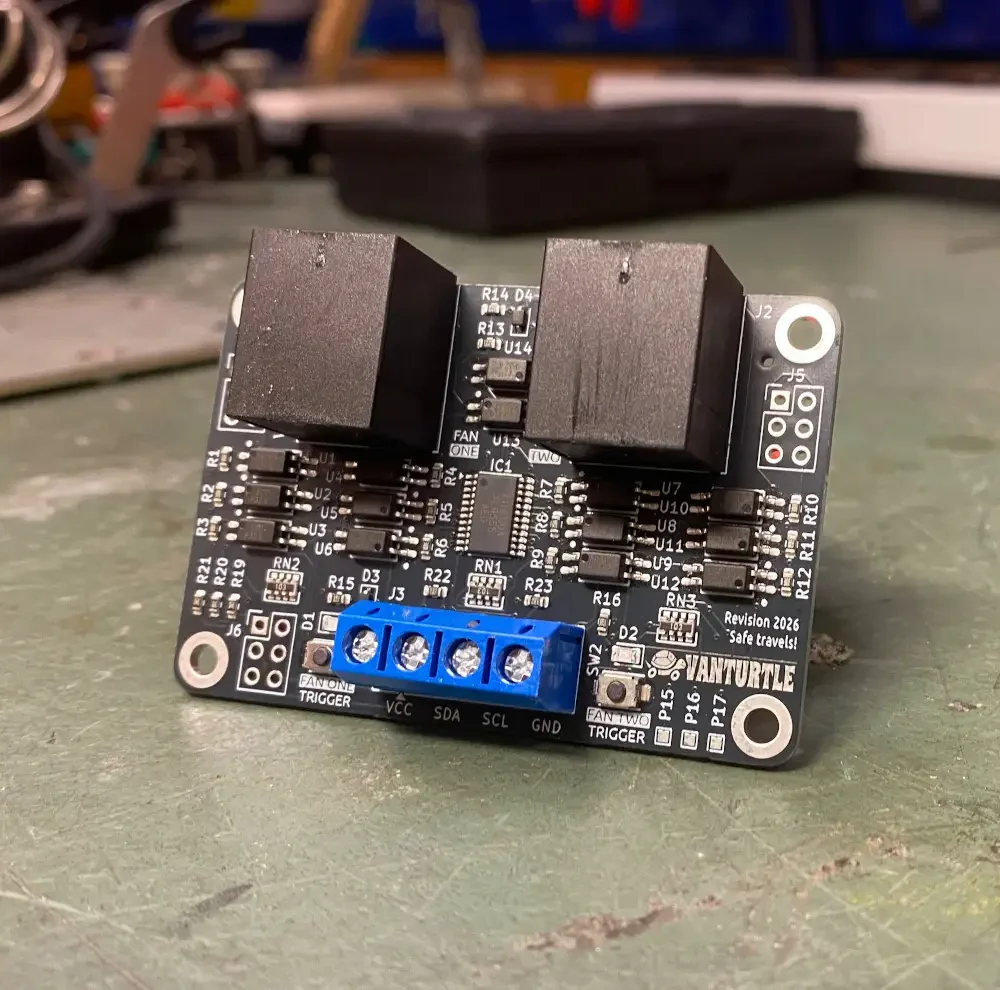
IMG_0740

New and improved

The second iteration of the controller makes for a smaller 65x45mm board and brings along many improvements.


  • Independent control of two fans
    Both ports function completely independently and can be driven in parallel. RJ45 and RJ11 can be on the same board.

  • Voltage swing tolerant
    Tested to handle between 9 and 14 volt from the fan, and between 3,3 and 5 volt on the I2C bus. Pull-up resistor on board.

  • Configurable addressing
    The I2C address can be changed with pin headers, theoretically supporting up to 18 fans on one bus.

  • Breakout pins
    Extra pins with everything ready to go to add more I2C sensors, like a temperature or level sensor.
  • Installed in just a few minutes, and it works perfectly with my Home Assistant setup. Finally I can control both maxxairs from my phone, and the old button panel still works too!

    – Alex P
    And his van Pinecone

    Perfect for your build

    No two van builds are the same, so you can fully personalize the connectors of the controller. You can choose which ports, terminals, and connectors you want, and we’ll hand-solder them onto the board for you. No worries, we make the selection process straightforward and guide you toward the right options for your fan model and setup.

    If you prefer a more hands-on approach, you can also order the board with all ports and terminals left unpopulated. That way, you’re free to solder directly to extra pads on the board or use connectors you already have on hand.

    IMG_0154

    Made by fellow travelers

    Designed by van enthusiasts for van enthusiasts, the VanTurtle Fan Controller was created for anyone who has experienced having to leave a cozy bed to fetch the remote control. Created to solve our own problems while building a van and refined from there, you can be assured that the card is made to last.

    We’re here to help whenever you run into an issue, just shoot us an email!
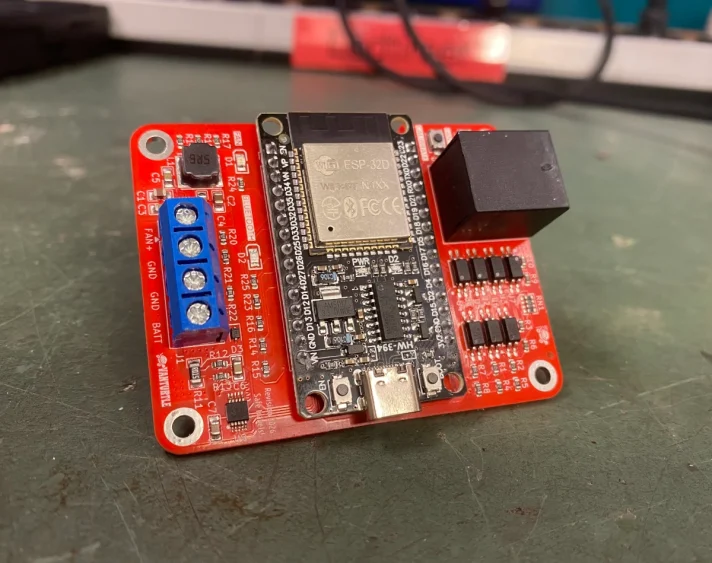
    Get one from just €9,99

    Shipping within the EU for just €4.

    IMG_0722

    Prefer something simpler?

    Our smart controller seamlessly integrates with iOS or Android over Bluetooth with no coding required. It is powered from the existing fan wiring, so no additional supply or complex installation is needed. It does not get any easier.

    Frequently Asked Questions

    Will it work with my fan?

    It should work with both the Maxxfan Plus and Maxxfan Deluxe series. If your fan has an 8-pin Ethernet jack (RJ45) or 6-pin phone port (RJ11/RJ25) you should be good to go!

    Known supported model numbers are 4500K, 4700K, 4800K, 4900K, 5100K, 7000K, 7500K, 8500K, 8700K, and 8900K. Many more models probably support it but have not been verified yet.

    Can i return it?

    You can return the board within 30 days of purchase for a full refund (postage not included). Since we customize each board to your specific setup we’re not legally required to offer returns, but we understand that plans change sometimes.

    Make sure the board is in good condition. Send us an email if you’d like to make a return and we will get you sorted out.

    How does it work?

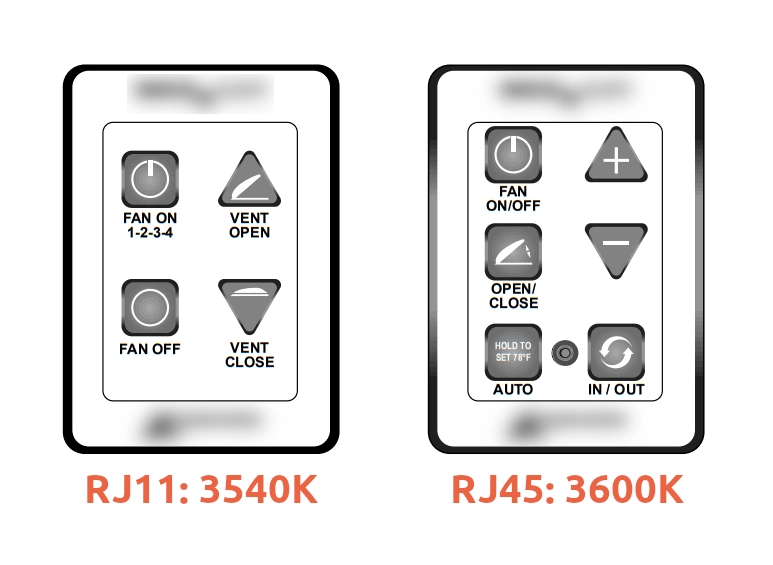
    We emulate a first-party 3540K button wall control panel for Plus fans or a 3600k (or 3650K) 6 button wall control panel for Deluxe fans. But instead of buttons you have to press yourself we use optocouplers to trigger the signals to the fan electronically. The way this works inside the fan is exactly the same as when you press a button on the control panel, so all inputs you can do there can be done by the VanTurtle controller.
    Can I use any Ethernet cable to connect it?

    We recommend using a quality cable that is rated for Power Over Ethernet. This makes sure that the wire you use actually has 8 strands inside it, as some cheaper cables only have 4 strands total. It’s best to keep the length of the cable under 10 meters (32 feet) to keep the voltage drop within acceptable ranges.
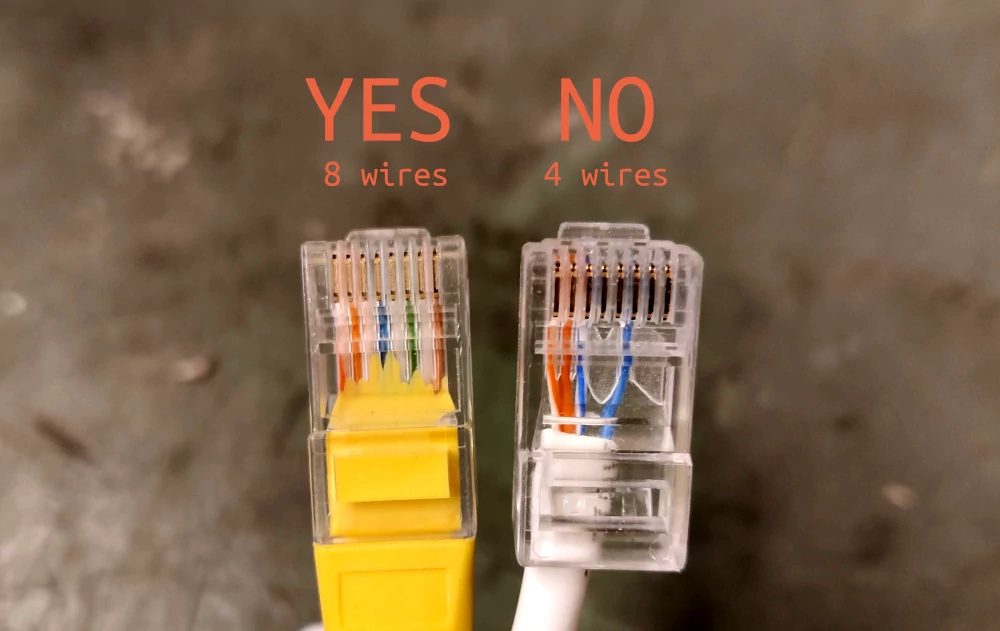
    Note however that the Ethernet port is located in a part of the fan that gets almost entirely cut off when you lower the fan onto the ceiling. Using a compact or “short body” Ethernet plug is a necessity. Neither plug shown above is short enough, they just show the difference in conductor count.

    What kind of protocol does the fan use?

    The MaxxFan Deluxe doesn’t use any digital communication protocol like UART, IIC, or CAN. Instead, it relies on simple electrical connections that directly mimic the physical button presses on its control panel. Each button corresponds to a specific pair of wires that, when connected, trigger the same action as pressing the button manually. For example, shorting pins 6 and 8 activates the “Faster” command, while pins 5 and 8 correspond to “Slower”. This makes the fan much easier to control  as no decoding or signal generation is required.

    You can read a whole lot more about it in this blog post.

    Are you endorsed by Airxcel at all?

    Not even a little bit. Maxxair, Maxxfan and Airxcel are all trademarks by AirX Intermediate Inc. and used on this page as an example of products that are compatible with this controller. We have nothing to do with them. We’re just fans.

    Is it possible to set the fan to a specific fan speed?

    Just like with the on/off command, it can’t be done directly but there is a reliable workaround. There are 10 speed levels and if you try to go lower than level 1 it will just beep at you but stay at level 1. So if you send 10 slower signals and 3 faster the fan will always be in a known speed mode of 4. This can be combined with the auto mode trick to “reset” the fan to a known state. Signals can be sent so fast that the fan does not have the time to spin down all the way, so besides the beeping it’s pretty smooth.

    Will this work with my MaxxFan if it doesn’t have a remote?

    Probably, check your fan for an RJ45 port first before ordering. If the fan has the port or is listed to be compatible with genuine wall mounted control panel then you should be all good to go.

    Can I still use the original remote or the fan’s button panel?

    Yes! The VanTurtle controller emulates the fan’s button panel, so you can still use the original remote or onboard buttons. Both manual and controller commands work seamlessly together.

    Do I need to modify the fan or open it up?

    No modifications are required. Just plug a cable into the existing port on the fans logic board. We see no reason this should void warranty, as the inputs are the same as pressing the buttons on the fan itself, but we can obviously never guarantee that.

    How do I change the I²C address?

    There is a 2×3 block of dupont pins to the left of the screw terminals which control the address. You’ll find markings for A0, A1 and A2 on the back of the board showing you which pins to connect. This allows up to 18 fans on the same I2C bus, use the table below to set the correct address:

    A0 A1 A3 Address
    Shorted Shorted Shorted 0x20
    Disconnected Shorted Shorted 0x21
    Shorted Disconnected Shorted 0x22
    Disconnected Disconnected Shorted 0x23
    Shorted Shorted Disconnected 0x24
    Disconnected Shorted Disconnected 0x25
    Shorted Disconnected Disconnected 0x26
    Disconnected Disconnected Disconnected 0x27

    Please refer to the documentation for more details.

    How do I physically install the VanTurtle Fan Controller into my van?

    Installation is simple. Just connect the controller to your fan using the built-in RJ45 or RJ11 port. The board can be mounted anywhere near the fan or your microcontroller using screws through the 4 mounting holes. You can also use adhesive pads or Velcro but they might not survive the next non-paved road. No modifications to the fan are needed.

    Keep in mind that the controller generates a tiny bit of heat, so do not mount it in an enclosed space like a ceiling. Make sure there is a fuse between VCC and your battery.

    Will the VanTurtle controller work with older MaxxFan models?

    We have yet to see a Deluxe or Plus fan model that we cannot support. If it has a RJ45 or Rj11 port you’re probably good to go. Older models without a port or with non-standard protocols may not be supported. Check your fan model before purchasing to ensure compatibility.

    Still have a question?